
Email management software serves a number of purposes, but they all come down to giving users a more suitable and flexible way to manage their mailbox. From faster communication to email security, these tasks fall within the scope of an email management tool.


15 Best Email Management Software And Tools
Reclaim your inbox with the best email management software and tools solutions that help organize, automate, and clean up your mailbox. We break down the best options in this comprehensive list.
Updated on June 29, 2026
What is Email Management?
Email management means organizing your messages in a way that improves productivity and communication. Because email remains a primary channel for both personal and work correspondence, handling it well is key to avoiding inbox overload, replying on time, and staying organized.
Critical aspects of email management include:
- Inbox Organization
- Email Filtering
- Unsubscribe and Spam Handling
- Prioritization and Time Management
- Archiving and Deleting
- Setting Email Boundaries
- Using Templates and Canned Responses
- Email Security
- Collaboration and File Sharing
- Mailbox Maintenance
That said, not every tool covers all of these areas, and even those that do may not handle each task equally well. Rather than grouping every system together, we will separate the best email management software according to the functions that will serve you best.
For instance, if you want an email tool to manage your incoming messages, what you need is a mail client. Gmail and Mailbird are two well-regarded clients, though plenty of other options exist.
If your goal is to process and organize messages in bulk, an email management service such as Clean Email or Sanebox is worth considering. Tools like these let you sort messages quickly, set up automations, clear out spam, and more.
Companies frequently need a way to handle the large volume of customer emails they receive daily. For that purpose, customer service email management software such as Freshdesk and Zendesk is the right fit.
Lastly, if you need software to run your email marketing campaigns, an email campaign management service like Mailchimp or SendGrid is a solid choice.
How We Determined The Best Email Management Apps
No email management tool is built to suit every user. Still, there are certain core features people expect from the best apps in this category.
In comparing dozens of email organization tools to build our list of recommendations, we weighed the following criteria:
- Compatibility with a wide range of email services
- Automated sorting, filtering, rules, and AI options
- Email prioritization
- Unsubscribe options
- Attachment management
- Scheduling and reminders
- Privacy and security
- Pricing
To assess all of this, we reviewed feature lists across many tools, then tested each app to confirm that it delivered the advertised features and that the experience was good enough to merit inclusion. As a result, our list isn't pulled straight from search results for "best email management software," it reflects hands-on use.
The Best Email Management Software Reviewed
As noted above, email management apps don't all function the same way. For that reason, we've organized our top 15 picks by category: email clients, mailbox management tools, customer support systems, and marketing-focused software.
Email management software apps:
- Gmail — best automated message sorting
- Mailbird — ideal for managing multiple inboxes
- Outlook — great for programming inbox rules
- Spark — best for large attachment sending
Email management tools and services:
- Clean Email — perfect for filtering messages
- Sanebox — good for set it and forget it sorting
Customer service email management software:
- Freshdesk — ensures the right employee gets the email
- Zendesk — ideal for sharing files with customers
- LiveAgent — best solution for organizing and managing email workflows
- Missive — ideal for small teams and support staff managing shared messages
Email campaign management software:
- Mailchimp — best for automation workflows for individual customer journeys
- SendGrid — powerful API makes customization a breeze
- Brevo — cost-effective platform for dynamic email and SMS campaigns
- Klaviyo — best for e-commerce with AI-powered email personalization
- HubSpot — best for personalized email outreach and contact management
The 4 Best Email Management Software (clients)
If you’re looking for the best email client to use, these email management apps offer robust features that help you achieve Inbox Zero and save time when responding to messages.
1. Gmail
Price: Free; Business plans start at $6/month
Gmail ranks among the most widely used email services available. It is easy to use and packed with features, and ongoing updates keep it a go-to option for millions of people around the world.
One advantage worth highlighting is Gmail's strong set of email organization features. The service relies on built-in machine learning that automatically sorts and groups messages into tabs like Primary, Social, Promotions, and Updates.
These tabs can be customized, and you can set rules to route emails into specific labels or folders, which makes managing your inbox easier. For more advanced handling, Gmail can connect with third-party tools to build a fuller ticketing system that helps teams manage customer support efficiently. You can also turn on the Priority Inbox feature to concentrate on your most important messages, which Gmail identifies based on how you interact with mail over time.
💡 Note: Unfortunately, Google does not offer a standalone desktop client specifically for Gmail. The most common way is to use Gmail through a web browser, by visiting mail.google.com.
Another key strength of this app is its automation. Gmail lets you schedule messages to go out at set times and receive automated reminders about important emails you need to answer by a certain point. The app also makes leaving unwanted mailing lists easier through an automated "Unsubscribe" option.
One drawback we noticed is Gmail's attachment size limit. The software only allows you to send and receive attachments of 25MB or less. You can get around this by saving files to Google Drive and sharing them that way, though it isn't always the most convenient route, particularly when the recipient doesn't use Google Drive.
On the privacy and security front, Gmail performs well. It uses encryption to protect messages both in transit and while stored on Google's servers, and it supports two-factor authentication (2FA) for an added layer of account protection. Google has also put strong measures in place to keep spam and phishing emails out of users' inboxes, lowering the chance of falling for online scams.
👍🏼 Pros:
- Free accounts are available.
- Compatible with virtually any device.
- Many organization and sorting options.
- Easy to unsubscribe from unwanted emails.
👎🏼 Cons:
- Doesn’t support large file attachments.
- Some features require lots of manual work.
2. Mailbird
Price: $79 for a lifetime license
Most people today rely on more than one email service, whether free or paid. If that describes you, Mailbird is worth considering as your email management software. It lets you handle all your messages and contacts from several accounts in a single unified inbox, and it connects with apps such as Facebook, Twitter, Whatsapp, Dropbox, Google Calendar, Asana, Todoist, and more.
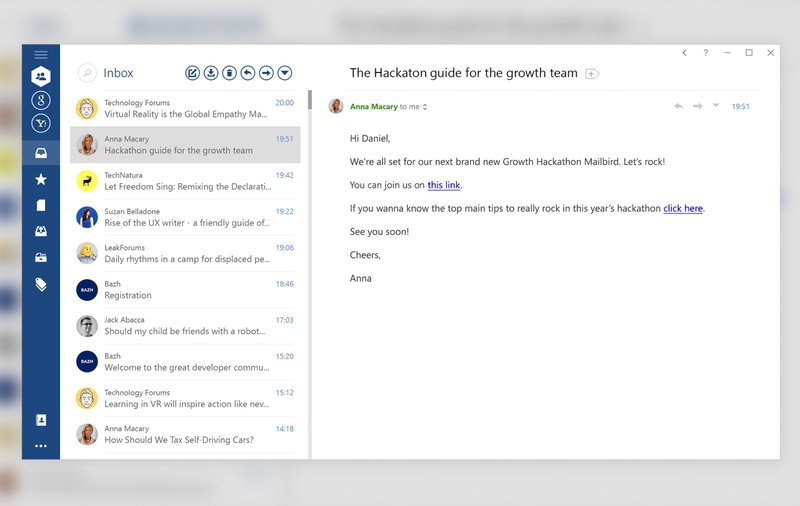
💡 Note: Mailbird is a desktop client available for Windows 11, 10, and macOS 13+. Unfortunately, it is not available for Android, and iOS users.
Since not every message arrives at a convenient moment, Mailbird lets you snooze emails so you can focus on the task at hand and come back to them later. The app also works offline, which means you can keep managing your mail even without a connection. Its built-in Speed Reader helps you grasp the main points of long emails quickly.
If email plays a central role in your daily routine, you'll appreciate Mailbird's keyboard shortcuts for archiving, composing, replying, forwarding, and other actions. The app has been translated into 17 languages so far, and its developers plan to keep expanding that multi-language support.
Mailbird is highly customizable, and its pricing suits a wide range of users, from individuals at home, who can use it free with some limitations, to businesses. The free version can't be used commercially and leaves out a number of useful features. Paying customers, for example, get priority support, the option to snooze emails, the LinkedIn Lookup feature, Exchange Mail support, and more.
Mailbird shows that email can be as accessible and convenient as today's instant messaging services. Its flexible pricing puts it within reach of home users on a tight budget, and its bulk discounts make it an appealing alternative to Microsoft Outlook for businesses looking to give employees a modern email management option.
👍🏼 Pros:
- Heavily customizable.
- Integrations with third-party apps.
- Modern user interface.
- Lifetime license available.
👎🏼 Cons:
- Doesn’t support inbox rules.
- Not yet available for Mac.
3. Outlook
Price: Free; $69.99/year for full features
Microsoft's email tool, Outlook, is a popular choice for managing email and personal information. It comes with a range of features aimed at improving productivity and organization, and it works well across many devices and email platforms.
Much like Gmail, Outlook offers solid email organization backed by automation. One feature we particularly like is Outlook Rules, which you can configure to file incoming messages into specific folders automatically based on criteria such as sender, subject, keywords, or recipients.
There is also a "Focused Inbox" that separates important emails from less urgent ones automatically, helping users stay on top of what matters. This is especially handy for anyone who receives a large number of messages each day.
Outlook further stands out through its integrations with other Microsoft products. The calendar integration is especially useful, since you can create and manage events and tasks tied to the emails you receive, and you can even share your calendar with colleagues or family members.
On the downside, Outlook caps file attachments at 20MB and doesn't handle attachments from Google well. It does integrate with OneDrive, though, which makes saving attachments to the cloud and retrieving them later straightforward.
Like Gmail, Outlook includes an unsubscribe feature for opting out of mailing lists easily. This option only appears, however, for messages where Outlook detects an unsubscribe link.
As a Microsoft product, Outlook puts considerable weight on privacy and security. It uses encryption to protect messages in transit and while stored on Microsoft's servers, and users can turn on two-factor authentication (2FA) for added account protection. Microsoft also issues regular updates and patches for security vulnerabilities to keep the email experience safe.
👍🏼 Pros:
- Outlook Rules make it easy to automate inbox tasks.
- Easy to integrate with Microsoft OneDrive and calendar.
- Strong emphasis on security and privacy.
👎🏼 Cons:
- Doesn’t support large attachments.
- Not all features are included in the free version.
4. Spark
Price: Free - $6.99/month based on the plan you select
Spark is a feature-rich email client from Readdle, built to give users a smooth, well-organized email experience across platforms. It works well for anyone juggling several inboxes who wants one place to manage them all.
Spark supports a broad mix of mail services, including Gmail, Outlook, Yahoo Mail, iCloud, and others, along with IMAP and Exchange accounts, so it fits users on many different providers. The app runs on Windows, Android, Mac, iPhone, iPad, and even Apple Watch, letting you handle your email wherever you are.
Where Spark shines is in email organization driven by automation and AI features. It uses smart algorithms to sort messages automatically into relevant groups such as Personal, Notifications, Newsletters, and Pinned, based on content and sender behavior. You can also set up custom rules and filters to automate inbox management further and keep your mailbox tidy.
As with other well-known email apps, Spark makes unsubscribing from unwanted lists simple. It detects newsletters and promotional messages and provides a one-tap "Unsubscribe" option right inside the email, so managing subscriptions is convenient.
Unlike mainstream providers such as Gmail and Outlook, Spark allows attachments up to 2GB. It also integrates smoothly with cloud storage services like Dropbox and Google Drive, which lets users send and receive large files without running into email size limits.
Spark includes a built-in calendar, and you can set reminders and snooze messages to address them at a better time. It can also sync with calendars from Google, Outlook, and iCloud.
👍🏼 Pros:
- Variety of Spark AI-powered organization features.
- Supports attachments up to 2GB.
- Connects with Google, Outlook, and iCloud calendars.
- Available on any platform.
👎🏼 Cons:
- Subscription is needed for most features.
The 2 Best Email Management Tools and Services
Email clients have improved a great deal, but not all of them include the features needed to put recommended email management practices into action and keep your inbox under control.
That's where dedicated email management tools come in: they give you fuller control over your inbox and offer automation that can take much of the work off your hands.
1. Clean Email
Price: Free for cleaning up to 1000 emails, Subscription
Clean Email is a straightforward inbox management application designed to help you reach Inbox Zero quickly. It works with all the major mail service providers and is available on mobile, macOS, and as a web app, so you can use it on nearly any platform.
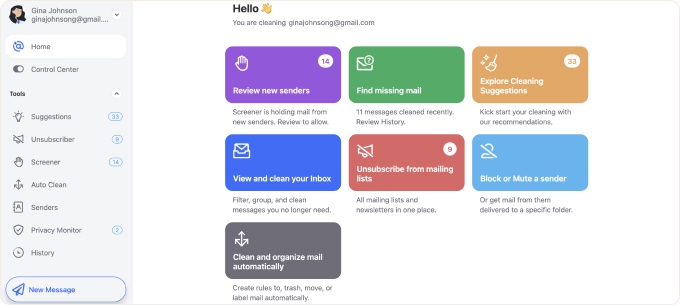
With its Auto Clean feature, you can automate email management by setting the app to carry out various inbox tasks for you. Once you create rules based on specific criteria, there's little need for manual work going forward.
If keeping unwanted subscriptions out of your inbox is a struggle, the Unsubscriber feature can help ensure newsletters and other junk mail stop appearing.
The app also organizes email through 33 predefined filters, called Smart Folders, that automatically group messages matching your criteria into manageable bundles.
Clean Email handles security and privacy by collecting only what it needs to organize your messages, and it does not read or store the content of your emails.
👍🏼 Pros:
- Unique features: Unsubscriber, Screener, Cleaning Suggestions, Smart Folders, and more.
- Reply, forward, and send messages directly within the app.
- Automatic email management.
- Maximum security.
- Works with all IMAP accounts, including Gmail, Outlook, and Yahoo.
👎🏼 Cons:
- Doesn't have a desktop app for Windows users.
- Doesn’t currently support sending outgoing attachments.
2. SaneBox
Price: starts at $7 a month
SaneBox takes a distinctive approach to inbox management. This mail sorting service connects to your account and sets up several folders that it uses to organize your messages automatically. The SaneLater folder holds distracting emails, the SaneNews folder collects newsletters, and the SaneCC folder gathers messages you were CC'd on.
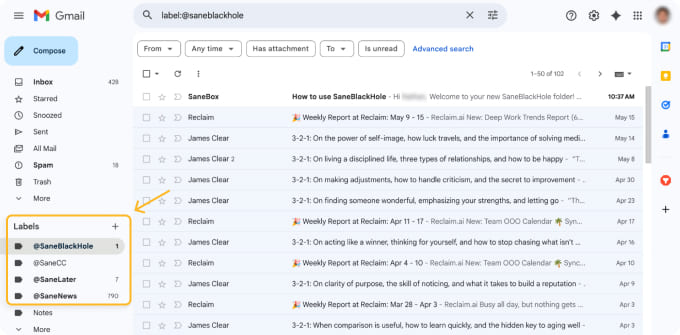
From there, all you have to do is glance at your SaneBox folders now and then in any email client and fix any mistakes it makes. The main benefit of this setup is that there's no new application to learn, since everything takes place inside your existing email service.
SaneBox has been helping people fight spam since 2010, and over that time its algorithms have grown highly accurate. On the rare occasion they get something wrong, you can correct it in just a few clicks.
Pricing begins at $9.99 a month, though the yearly or two-year subscriptions bring the cost down considerably. Students, non-profits, and government agencies can request a 25% discount by contacting SaneBox customer support during the free trial. Whichever plan you pick, you can cancel at any time.
👍🏼 Pros:
- No need to learn a new application.
- Reputable email manager app.
- Great results.
👎🏼 Cons:
- Its unique approach isn’t for everyone.
The Best 4 Client Service Email Management Software
Even a small business fields dozens of customer support messages a day, and those messages can easily slip through the cracks when they land straight in your Gmail or a similar inbox. The options below are our top picks if you need an email management service built around customer service.
1. Freshdesk
Price: Free trial available; starting at $15/user per month
Freshdesk is one of the most popular help desk systems for managing customer support email. Much of its appeal comes from its broad compatibility with email providers, its ability to combine multiple accounts, and its range of features for handling support tickets efficiently. Businesses of any size can get value from it.
Freshdesk gives users a capable email organization tool along with automation options. In our testing, the software used AI-driven automation to sort, categorize, and route incoming support emails to the right teams or agents according to predefined rules and criteria. This streamlines the ticketing process and helps ensure inquiries reach the relevant people promptly.

Freshdesk also lets users prioritize support emails effectively. The platform assigns priority levels to incoming tickets automatically based on rules such as keywords, requester type, or urgency, so critical issues get immediate attention.
One notable shortcoming is Freshdesk's limited spam handling. The system has no "Unsubscribe" feature for emails, nor does it apply the kind of advanced spam filtering some other apps offer. We also found it lacks scheduling, which means you can't use it for marketing blasts alongside support tickets.
On the security side, Freshdesk follows industry-standard practices, including data encryption, secure transmission of information, and access controls. It also complies with data protection regulations to safeguard sensitive customer information, which can matter a great deal for certain types of businesses.
👍🏼 Pros:
- Supports multiple users and provides collaborative features.
- Provides automation options for assigning emails to the right person.
- Security features protect data within messages.
👎🏼 Cons:
- No spam or unsubscribe features.
- No calendar integration.
2. Zendesk
Price: Starting at $19/month per agent
Zendesk is another leading customer service and support platform, offering a broad set of features that help businesses manage customer inquiries and support tickets efficiently. It works with various email providers and can integrate multiple mail accounts, letting businesses centralize their support communications and handle messages from different sources in one place.
Our testing showed that Zendesk does email organization well, backed by strong automation. It can sort, categorize, and route incoming support emails to the right departments or agents automatically based on predefined rules and keywords. This simplifies the ticketing process and helps make sure customer inquiries reach the appropriate teams quickly.

Zendesk also supports email attachments, so you can receive screenshots and other files from customers or send them attachments such as instructions, shipping labels, or other useful details. It isn't built for email marketing, though, so it offers no opt-out features or similar anti-spam tools, and it doesn't let you schedule messages to go out at optimal times.
On privacy and security, Zendesk places a strong emphasis. It uses industry-standard measures, including data encryption, secure transmission of information, and access controls, and it complies with data protection regulations to protect sensitive customer information.
👍🏼 Pros:
- Compatible with a variety of email clients and other business tools.
- Provides automation options for assigning emails to the right person.
- Security features protect data within messages.
👎🏼 Cons:
- No spam or unsubscribe features.
- No calendar integration or scheduling capabilities.
3. LiveAgent
Price: Free trial available; starting at $9/user per month
LiveAgent is a customer service platform built to manage email communications through a dependable ticketing system, which makes it a fit for businesses of any size. It isn't strictly an email management tool, but it does include useful features for organizing and running email workflows.
Through smooth integration with a range of email providers, LiveAgent pulls support tickets from several sources into one easy-to-use platform. Its automation features sort, categorize, and route incoming emails to the right agents or teams according to custom rules, keeping your support process organized and responsive.
LiveAgent also helps you stay on top of support email by prioritizing and organizing it. The system sets priority levels for tickets automatically based on factors such as urgency, customer importance, or issue complexity, so important requests get handled quickly.
Security is a major focus for LiveAgent. The platform meets high industry standards, including end-to-end encryption and strict access controls, to keep customer data safe. It also fully complies with major data protection regulations, making it a trustworthy choice for handling sensitive information.
👍🏼 Pros:
- Advanced automation tools for efficient email routing.
- Supports multiple users and collaboration.
- Strong security and compliance features.
👎🏼 Cons:
- Lacks tools for email marketing and scheduled sending.
- Spam management features could be more robust.
4. Missive
Price: Free plan available; paid plans start at $14–$18/user per month, rising to $36/user for advanced features on yearly billing.
Missive is a collaborative email client that pairs the familiar feel of a standard inbox with strong team-oriented features. Well suited to small teams and support staff handling shared messages, it lets people work together without reducing every conversation to an abstract ticket.
With Missive, you can assign conversations to specific people, draft replies together, chat internally next to your emails, and apply shared labels or workflows, all within a clean, email-first interface. It also includes more advanced tools such as AI-assisted drafting, summarization, translation, and smart automations added in recent updates.

One of its main strengths is its wide range of integrations, spanning CRM platforms (such as HubSpot and Pipedrive), task managers (Asana, Trello, and ClickUp), and communication channels like WhatsApp, SMS, and even OpenAI connectors. It also handles multiple inboxes smoothly, including Gmail, Outlook, and IMAP.
👍🏼 Pros:
- Real-time team collaboration with internal chat, @mentions, shared inboxes, and co‑drafting
- Rich automation and AI features for drafting, rules, and thread management
- Broad integrations: CRMs, task tools, messaging channels, so Missive can act as your central inbox
- SOC 2 Type II certified, offering solid security for teams handling sensitive communication
👎🏼 Cons:
- Some integrations (e.g., HubSpot) lack depth—users note missing CRM details or email tracking capabilities
- Advanced analytics are locked behind higher-tier plans
- Occasional learning curve—several users found the interface complex at first
The Best 5 Email Management Software and Services for Email Campaigns
Most email clients work well for firing off quick messages to one or two people, but they aren't suited to sending carefully crafted email campaigns for a business. The tools below are built for exactly that. They aren't the strongest options for inbox management, yet they're well suited to marketing and transactional messages, as you'll see.
1. Mailchimp
Price: Free base plan; plans with all features start at $13/month
Mailchimp is a widely used email marketing platform with a full set of features for managing campaigns and engaging an audience effectively. It supports various email providers and connects with different email marketing tools, which makes it a flexible, accessible email management service.
A standout feature is its automation workflows, which let you build automated emails around individual customer behaviors, triggers, or specific events. These workflows can include automated sorting, filtering, and personalized content delivery, so subscribers get relevant messages based on their preferences and actions.
You can also segment your subscriber lists and target specific groups by criteria such as engagement level, purchase history, or demographics.

Mailchimp also includes an easy "Unsubscribe" feature for marketing email. When recipients click the unsubscribe link, Mailchimp removes them from your mailing list automatically, which keeps you compliant with anti-spam regulations and helps you maintain a clean, engaged subscriber list.
Mailchimp isn't meant to serve as an email client, so it lacks many of the features we've noted in other email management tools. It does, however, give you full control over scheduling when messages go out, along with reporting metrics on open rates, click rates, and other customer behavior data.
Mailchimp takes privacy and security seriously as well. It applies industry-standard measures, including data encryption, secure transmission of information, and access controls, to protect customer data, and it complies with data protection regulations to safeguard sensitive information and maintain user trust.
👍🏼 Pros:
- Great scheduling capabilities for marketing emails.
- Includes required anti-spam measures.
- Easily integrates with most systems.
👎🏼 Cons:
- Not an email client.
2. SendGrid
Price: Free version available; pricing starts at $15/month for paid plans
SendGrid is a dependable email management system built for businesses and developers that need to send transactional and marketing email efficiently. It may lack traditional email organization or prioritization features, but its emphasis on delivery performance and strong API make it a valuable option for anyone after a smooth email delivery solution. It works with various email services and integrates easily with many programming languages, frameworks, and email clients, which suits developers and businesses with a wide mix of email needs.
Since SendGrid centers on email delivery, it isn't set up for organization features like automated sorting, filtering, or rules, and it isn't an email client by default. Developers can, however, build custom organization logic with SendGrid's API and webhooks to manage incoming responses when needed. Otherwise, you can route replies to SendGrid marketing emails toward your primary inbox or a destination such as Freshdesk or Zendesk.
Though it's the reverse of how we usually think about unsubscribing, SendGrid provides an unsubscribe feature so businesses can comply with anti-spam regulations and give recipients a clear way to opt out of marketing email.
Where SendGrid truly excels is scheduling. Its email scheduling feature lets businesses send messages on specific dates and times, so they reach recipients at the most fitting moments. You can even draw on the built-in performance metrics (open rate, click rate, and so on) to fine-tune your scheduling and get the most from your email list.
👍🏼 Pros:
- Great scheduling capabilities for marketing emails.
- Includes required anti-spam measures.
- Easily integrates with most systems.
👎🏼 Cons:
- Not an email client.
3. Brevo
Price: Free plan with limited features; paid plans start at $25/month
Brevo is an all-in-one email marketing platform positioned as a cost-effective alternative to Mailchimp, with a broad range of features for building email campaigns and automating workflows.
Brevo's visual email builder makes designing engaging newsletters simple. Its drag-and-drop interface keeps message creation quick and easy, and a template library organized into categories helps you start producing polished emails even without prior design experience.
Once your email is ready, Brevo's contact management system lets you group contacts into lists, segment them, and edit individual records in just a few clicks. From there, you can set up triggers, such as website visits or abandoned shopping carts, and build workflows that send targeted emails in response.
What sets Brevo apart from both Mailchimp and SendGrid is its SMS capability, which lets businesses send text messages to customers, either as standalone campaigns or as part of automated workflows. That makes it a versatile choice for anyone who needs to manage several types of customer communication.
👍🏼 Pros:
- Cost-effective
- Easy-to-use email builder
- Robust marketing automation features
- Includes SMS marketing
👎🏼 Cons:
- Reports of inconsistent deliverability in some cases
4. Klaviyo
Price: Free plan for up to 250 contacts; Premium plans start at $20/month for email only and $35/month for email and SMS
Klaviyo is an email marketing platform built for e-commerce businesses, with advanced segmentation, automation, and reporting features. It integrates well with popular e-commerce platforms such as Shopify, BigCommerce, Magento, and WooCommerce, which has made it a favorite among online retailers.
Beyond its e-commerce focus, another thing that sets Klaviyo apart is its use of AI and predictive analytics. With features like AI-generated subject lines, its algorithms can produce copy aimed at converting, taking much of the guesswork out of writing engaging subject lines.
The platform's recommendation engine adds dynamic product suggestions to emails based on a user's browsing history, past purchases, and other behaviors, which helps personalize the customer experience.
Klaviyo's predicted customer attributes also let businesses segment or personalize emails around factors such as predicted lifetime value, order date, and churn risk, allowing for more targeted, effective campaigns.
Klaviyo is fairly expensive next to other email marketing platforms, but its advanced features and e-commerce focus make it a worthwhile investment for online retailers looking to grow through targeted marketing.
👍🏼 Pros:
- Great integration with popular e-commerce platforms
- Comprehensive AI-driven reporting
- Intelligent customer segmentation
- SMS marketing capabilities
👎🏼 Cons:
- Challenges with getting timely support
- Steep learning curve for beginners
5. HubSpot CRM
Price: Free base plan; paid packages start at $9/user/month
HubSpot CRM comes with a range of email automation tools well suited to sales and marketing teams, and its automatic lead database enrichment is one of the platform's highlights. HubSpot uses AI-powered features to research and update your contact lists automatically with information drawn from publicly available sources. You can then use those details to build highly personalized sales or marketing email campaigns at scale.

HubSpot also offers a drag-and-drop email designer with a generous set of use-case-specific templates, while its workflow automation builder lets you schedule email sequences, follow-ups included, around particular prospect interactions. You can trigger a sequence whenever a lead downloads content from your website, clicks a link, or opens one of your earlier messages, for example.
The CRM can also bring together prospect information from across HubSpot's Sales, Marketing, and Service Hub, giving you a 360-degree view of each prospect's past interactions and a clear picture of how leads move through your sales and marketing funnels.
Beyond that, you can run email A/B testing and track analytics. Given its ease of use, affordable entry-level pricing, and overall feature set, HubSpot CRM is a strong option for solopreneurs or small business owners looking to raise their email game.
👍🏼 Pros:
- Automatic database enrichment
- Native integration with Gmail and Outlook
- Solid email personalization features
- Access to numerous other sales, marketing, and customer service features (free and paid)
👎🏼 Cons:
- Steep pricing differences between packages can make scalability a challenge
Benefits of Using Email Management Software
Email management software brings a number of benefits for individuals and businesses alike. Some of the main advantages include:
- Improved Organization: Email management software helps users organize their messages more efficiently. With folders, tags, labels, and automated sorting, you can categorize and prioritize emails for quick access and a smoother workflow.
- Time Savings: Automated filtering and sorting cut down on the need to process and organize email by hand. That frees users to concentrate on more important tasks and reply to urgent messages without delay.
- Enhanced Productivity: By improving email organization and putting important messages within easy reach, this software boosts productivity. Users can move through their inbox more efficiently and avoid overlooking anything important.
- Better Email Prioritization: Many tools offer prioritization features that let users spot and tackle high-priority emails first, so critical communications get prompt attention.
- Reduced Email Clutter: Automated unsubscribe features and spam filtering trim inbox clutter by clearing out unwanted and irrelevant messages, leaving a cleaner, more manageable inbox.
- Attachment Management: These tools often handle attachments more effectively, letting users preview, download, and share files easily and avoid clutter from large attachments.
- Seamless Collaboration: Some inbox management tools include collaboration features that help teams work on emails together, share drafts, and coordinate responses more efficiently.
- Email Scheduling and Reminders: Users can schedule messages to send later, composing them whenever it's convenient and having them delivered at the best times. Reminders also help with follow-ups and key dates.
- Privacy and Security: Many tools make data privacy and security a priority, using encryption and other safeguards to keep emails and sensitive information protected.
- Centralized Communication: Email management software often integrates with other tools and platforms, letting users manage several communication channels from one place for better organization and collaboration.
- Reporting and Analytics: Some tools include reporting and analytics that offer insight into email performance, open rates, and click-through rates, which can help refine campaigns and improve communication strategies.
Conclusion
You don't have to be an email management expert to keep a clean inbox. It just takes a few good habits backed by a solid email management application like the ones recommended above. Best of all, you can mix and match any of these suggestions to take your mailbox organization even further. There's no one-size-fits-all answer when it comes to email management services. That said, if you want a separate app for better focus, Spark stands out for its smart organization features. When searching for the right email management tool for a small business, start with a budget in mind. As a small business, you don't want to overspend on an email tool, so look for something affordable while still weighing how effective it is. It's also worth checking public reviews of different tools before you make a final decision. Freshdesk and Zendesk rank among the best customer service email management tools, valued for their strong ticketing systems and smooth integration with various communication channels to improve customer support. Best Email Management Software - FAQs
Clean your email lists today.
Verify 200 emails for free. For lists over one-million emails, we will beat the price of any competitor, guaranteed.